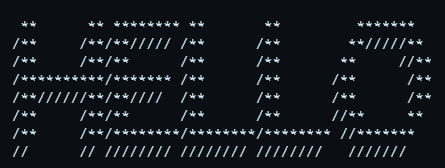
Type something and the ASCII banner will appear here.
Try an example
All fonts
Click “Use” on any style to apply it.
Want the details first? The FIGlet font reference shows every font rendered at full size, with its height, width and best use.
How to use it
Type or paste your text. Short words are easier to fit into a chat or README.
Choose a font, or open the font gallery to compare your text in every FIGlet style.
Use a preset to select a font and uppercase setting. The width check reports the actual number of columns; use a compact font or shorter text if your result is too wide.
Copy the banner, download TXT, PNG or SVG, or share a link that restores your text and font.
Tips for a better result
Wrap the output in a fenced code block when you paste it into Discord, GitHub or Reddit. Without monospace rendering the alignment collapses.
Blocky fonts such as Block, Banner3 and ANSI Shadow stay readable at small sizes. Script fonts look better large.
Keep Discord banners under about 40 characters wide so they survive a phone screen.
Accented and non-Latin characters are not present in most FIGlet fonts; they fall back to a placeholder or are dropped.
The permalink button encodes your text and settings into the URL, which is handy for sharing a banner someone else can edit.
Common questions
What is FIGlet?
FIGlet is a long-standing format for large letters drawn out of smaller characters. Each font is a text file describing how to draw every glyph, which is why hundreds of styles exist.
Why does my banner break when I paste it?
Almost always because the destination renders it in a proportional font. Use a code block, or a channel that preserves monospace, and the alignment returns.
Can I use these banners commercially?
Yes. The output is plain text you generated, and ASCIIForge claims no rights over it. The FIGlet fonts themselves are distributed under their own permissive licences.
How do I get coloured ASCII in a terminal?
Text banners support TXT, PNG and SVG. In SVG / ANSI export colors, choose text and background colors, then download SVG or copy/download ANSI for a compatible terminal. Those color settings affect SVG/ANSI exports only.
See what you can make
Real exports from these tools. Open an example to change its text, image settings or size.